- 本文地址: https://www.laruence.com/2009/05/26/871.html
- 转载请注明出处
最近要安排我为BIT提供的《PHP高级应用--关于PHP你不知道的》一门课的讲课素材, 其中有部分涉及到PHP和Gtk2开发桌面应用的部分, 于是抽空就想写一了一个demo出来.
这是一个经典的求24的算法的PHP实现, 加上了Gtk2的界面, 其实也没什么复杂的, 和MFC开发没什么太大的区别, 唯一的不爽, 就是要自己用代码来写布局。。。
有兴趣的同学可以看看.
后记: 这里有一个网页版的, 可以用来玩玩: http://www.laruence.com/stashes/compute.php
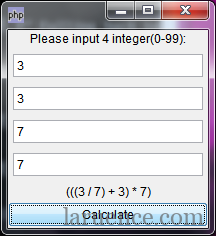
完整源代码(PHP-Gtk example):
  <?php
/**
 * A 24 maker
 * @version 1.0.0
 * @author laruence<laruence at yahoo.com.cn>
 * @copyright (c) 2009 http://www.laruence.com
 */
class TwentyFourCal extends GtkWindow {
	private $chalkboard;
	private $inputs;
	public  $needle = 24;
	public  $precision = '1e-6';
	function TwentyFourCal() {
		parent::__construct();
		$this->draw();
		$this->show();
	}
	/**
	 * 画窗体方法
	 */
	public function draw() {
		$this->set_default_size(200, 200);
		$this->set_title("24计算器");
		$mesg   = new GtkLabel('Please input 4 integer(0-99):');
		$this->chalkboard = new GtkLabel();
		$this->inputs = $inputs = array(
			new GtkEntry(),
			new GtkEntry(),
			new GtkEntry(),
			new GtkEntry()
		);
		/**
		 * container
		 */
		$table = new GtkTable(4, 1, 0);
		$layout = array(
			'left'  => 0,
			'right' => 1,
			'top'	=> 0,
			'bottom' => 1,
		);
		$vBox = new GtkVBox(false, true);
		$vBox->pack_start($mesg);
		foreach ( $inputs as $input ) {
			$input->set_max_length(2);
			$table->attach($input, $layout['left'], $layout['right'],
				$layout['top']++, $layout['bottom']++);
		}
		$vBox->pack_start($table);
		$button = new GtkButton("Calculate");
		$button->connect("clicked", array($this, "calculate"));
		$vBox->pack_start($this->chalkboard);
		$vBox->pack_start($button, true, false);
		$this->add($vBox);
	}
	public function show() {
		$this->show_all();    // 显示窗体
	}
	private function notice($mesg) {
		$this->chalkboard->set_text($mesg);
	}
	/**
	 * 取得用户输入方法
	 */
	public function calculate() {
		$operants = array();
		$inputs   = $this->inputs;
		foreach ($inputs as $input) {
			$number = $input->get_text();
			if (!preg_match('/^\s*\d+\s*$/', $number)) {
				$this->notice('pleas input for integer(0-99)');
				return ;
			}
			array_push($operants, $number);
		}
		$length = count($operants);
		try {
			$this->search($operants, 4);
		} catch (Exception $e) {
			$this->notice($e->getMessage());
			return;
		}
		$this->notice('can\'t compute!');
		return;
	}
	/**
	 * 求24点算法PHP实现
	 */
	private function search($expressions, $level) {
		if ($level == 1) {
			$result = 'return ' . $expressions[0] . ';';
			if ( abs(eval($result) - $this->needle) <= $this->precision) {
				throw new Exception($expressions[0]);
			}
		}
		for ($i=0;$i<$level;$i++) {
			for ($j=$i+1;$j<$level;$j++) {
				$expLeft  = $expressions[$i];
				$expRight = $expressions[$j];
				$expressions[$j] = $expressions[$level - 1];
				$expressions[$i] = '(' . $expLeft . ' + ' . $expRight . ')';
				$this->search($expressions, $level - 1);
				$expressions[$i] = '(' . $expLeft . ' * ' . $expRight . ')';
				$this->search($expressions, $level - 1);
				$expressions[$i] = '(' . $expLeft . ' - ' . $expRight . ')';
				$this->search($expressions, $level - 1);
				$expressions[$i] = '(' . $expRight . ' - ' . $expLeft . ')';
				$this->search($expressions, $level - 1);
				if ($expLeft != 0) {
					$expressions[$i] = '(' . $expRight . ' / ' . $expLeft . ')';
					$this->search($expressions, $level - 1);
				}
				if ($expRight != 0) {
					$expressions[$i] = '(' . $expLeft . ' / ' . $expRight . ')';
					$this->search($expressions, $level - 1);
				}
				$expressions[$i] = $expLeft;
				$expressions[$j] = $expRight;
			}
		}
		return false;
	}
	function __destruct() {
		Gtk::main_quit();
	}
}
new TwentyFourCal();
Gtk::main();    //进入GTK主循环
?>
GTK1的API Reference : http://gtk.php.net/manual/en/gtk.gtkentry.php
GTK2的API Reference: 很不完整
http://php.net/manual/zh/ui.setup.php
现在出来php-ui了,我也想学学php开发cs软件,这些都有啥区别?
不知道作者如何处理中文问题,或者是文件的编码应该用什么?标题或者内容用了中文会显示乱码。
上一条评论还是在7年前~~~~~
[…] Dec 08 一个低概率的PHP Core dump 21 Feb 09 PHP字符串比较 26 May 09 PHP+Gtk实例(求24点) PHP受locale影响的函数 PHP […]
布局?其实也没什么复杂的
文档 怎么报404错误呢?
It’s great that people can receive the mortgage loans moreover, that opens up new chances.
呵呵,以前也研究过一段时间,有个老美的网站专门介绍PHP+Gtk的应用。
http://www.kksou.com
不知道gtk2.0以后现在有没有免费打包的exe工具,前一阵搜的时候都还支持1。0
有…, PriadoBlender. http://www.priadoblender.com/
gtkmm?
PHP可以和enlightment和起来做更件梦幻的GUI程序,只是,这种组合只能在Linux中用。
你啥时候回国呢?
呵呵,学习,越发的发现您老的强大啊!
gtk经过php一封之后已经看不到多少东西了,我还是喜欢c的gtk
http://www.54chen.com/8021x
以前用gtk2.0+做的一个拔号软件
恩, php-gtk2暴露的API能更多一些, 但是文档工作太差…
PHP高级应用–关于PHP你不知道的
————————
能不能发给我一份呢
315224416@qq.com
你好, 现在还只是个PPT大纲, 等讲完课, 我补充下, 可以拿出手了, 会放出来的.