- 本文地址: https://www.laruence.com/2010/03/31/1377.html
- 转载请注明出处
东方时尚又改版了, 现在改成window.open了, 不让刷新了, 这个脚本现在也不能用了.
因为东方时尚做了一些调整, 原来的脚本不能用了.
马上有人要报名了, 所以挑个时间升级了下.
目前是2.0, 可以无人值守.
升级了选择时段功能, 更加方便.
安装方法:
1. 需要firefox
2. firefox需要安装greaseMonkey插件, 插件地址: https://addons.mozilla.org/en-US/firefox/addon/748
3. 用firefox浏览本页, 并点击安装
使用方法
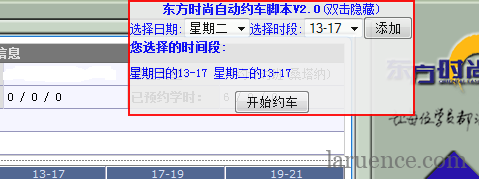
安装以后, 请登录东方时尚的约车页面, 会在页面上发现一个浮出框, 在里面选择好自己想要的时间段以后(可以选择多个,点添加), 点击开始约车....
// ==UserScript==
// @name dffs_booking_script
// @namespace dffs.booking
// @include http://yueche.dfss.cn/web/cmp/yc.aspx*
// @include http://114.251.109.202/web/cmp/yc.aspx*
// @version 2.0
// @author laruence<http://www.laruence.com>
// @copyright Copyright (c) 2010 laruence , All rights Reserved
// ==/UserScript==
//
//每次请求之间的延迟, 不用太短, 机器会郁闷的。
var delay = 10; //5秒
//
var START = true;
var delegate = function() {
var day_map = ['日', '一', '二', '三', '四', '五', '六'];
var period_map = ['7-9', '9-13', '13-17', '17-19', '19-21'];
var url = window.location.href;
var book_period = [];
var self = this;
var time = new Date();
var today = time.getDay();
var expect_period = [];
if( typeof delegate.__initilized__ == 'undefined' ) {
delegate.prototype.init = function(flag) {
var x = document.createElement("div");
var btn = null;
x.id = "m-btn-o";
x.innerHTML = "<style>#m-btn-o{border:solid 2px red; overflow:hidden;"
+ "background-color:#eee;left:20px; color:blue;"
+ "top:20px;left:600px;position:absolute; opacity:0.9;}</style>"
+ "<b>东方时尚自动约车脚本V2.0</b>(双击隐藏)<br/>";
document.body.appendChild(x);
x.addEventListener("dblclick", function() {
if (x.style.height == "20px") {
x.style.height = "";
} else {
x.style.height = "20px";
}}, false);
if (flag) {
var sel_date = "选择日期:<select id='sel_date'>";
for (var i=0;i<day_map.length;i++) {
sel_date += "<option value=\"" + i + "\" >星期"
+ day_map[i] + "</option>";
}
sel_date += "</select>";
var sel_time = "选择时段:<select id='sel_time'>";
for (var i=1;i<=period_map.length;i++) {
sel_time += "<option value=\"" + i + "\" >"
+ period_map[i-1] + "</option>";
}
sel_time += "</select>";
x.innerHTML += sel_date + sel_time;
x.innerHTML += "<button id='add-book-sq'>添加</button>";
x.innerHTML += "<div style=\"text-align:left;height:50px;\">" +
"<b>您选择的时间段:</b><br/>"
+"<p id=\"book_notice\"></p></div>";
x.innerHTML += "<div><button id='m-btn'>开始约车</button></div>";
document.getElementById("add-book-sq").addEventListener('click'
, function(e) {
var day = document.getElementById('sel_date').value;
var period = document.getElementById('sel_time').value;
var key = day + "-" + period;
for (var i in expect_period) {
if (expect_period[i].toString()
== [day, period].toString()) {
return true;
}
}
expect_period.push([day, period]);
document.getElementById("book_notice").innerHTML += "星期" +
day_map[key.split('-')[0]] +
"的" + period_map[key.split('-')[1] - 1]
+ " ";
}, false);
btn = document.getElementById("m-btn");
btn.addEventListener("click", function() {
self.next(true);
}, false);
} else {
var book_periods = url.split("&book_str=")[1].split(',');
for (var key in book_periods) {
expect_period.push(book_periods[key].split("-"));
}
x.innerHTML += "<button id='m-btn'>停止</button></div>";
btn = document.getElementById("m-btn");
btn.addEventListener('click', function() {
self.next(false);
}, false);
setTimeout(function() {
self.start();
}, 2000);
}
}
delegate.prototype.next = function(flag) {
if (flag) {
var book_str = [];
for (var i in expect_period) {
if (expect_period[i].length) {
book_str.push(expect_period[i].join("-"));
}
}
if (book_str == '') {
window.location.replace(url.split('&automatic_booking')[0]
+ "&booking_finish=1");
} else {
window.location.replace(url.split('&automatic_booking')[0]
+ '&automatic_booking=1&book_str='
+ book_str.join(","));
}
} else {
window.location.replace(url.split('&automatic_booking')[0]);
}
}
delegate.prototype.start = function() {
var text = document.getElementById('gridgrid_div').innerHTML;
self.isAvailable(text);
}
delegate.prototype.isAvailable = function(text){
for ( var i=0, l=expect_period.length; i<l; i++ ) {
var expect_day = expect_period[i][0];
expect_day = ((expect_day - today) + 7) % 7;
var id = "grid_grid_ci_0_" + expect_period[i][1]
+ "_" + expect_day + "_imgButton";
var input = document.getElementById(id);
if(input && input.src.indexOf('02.gif') != -1 ) {
/**
* igtbl functions
* defined in ig_WebGrid.js line 2477
*/
var grid = unsafeWindow.igtbl_getGridById('gridgrid');
var cellId = "gridgridrc_" + expect_day
+ "_" + expect_period[i][1];
var cell = unsafeWindow.igtbl_getCellById(cellId);
grid.setActiveCell(cell); // important
var evt = document.createEvent("MouseEvents");
evt.initEvent("click", true, true);
input.dispatchEvent(evt);
return true;
}
if (input && input.src.indexOf('01.gif') != -1) {
expect_period[i] = [];
}
}
self.next(true);
}
delegate.__initilized__ = true;
}
}
window.addEventListener('load', function() {
var agent = new delegate();
if ( window.location.href.indexOf('automatic_booking=1') != -1 ) {
agent.init(!START);
} else if (window.location.href.indexOf('booking_finish=1') != -1) {
alert("全部预订完成");
return true;
} else {
agent.init(START);
}}, false);
Google Code: http://code.google.com/p/dffsbooker/downloads/list
[…] 因为东方时尚改版, 请参看约车脚本2.0 […]
来晚了
别给弄死了
厉害!
The first sleeping bag, called the “Euklisia Rug,” was invented during the late 19th
century by mail-order pioneer and Welsh millionaire Pryce Pryce Jones.
You’re going to be placing it in a bag to transport it anyhow, why
not use this time to give it a bit of juice. When I came out
of hospital and everything finally sunk in, I remember going upstairs into my bedroom and just bursting into tears.
感谢楼主
目前不能用了。。
博主能否更新一下? 多谢多谢
学车中谢谢分享~
打扰了,按您这个装了,没有弹出框,是不是这个现在不能用了呀。
ratsrats012你这个人真无耻,人家免费共享的代码,你抄袭然后去卖,真恶心,大傻逼。
楼主啊,你的代码不行了, 加入验证码了, 我苦哈哈干了好长时间才搞定, 我先挣点钱吧。
http://item.taobao.com/item.htm?id=8670914831
几十元就约完整个散段, 比周末班更划算, 包约到周末的车。
咨询电话:13401197192
咨询qq:1696148434
点击“开始约车”按钮后是404错误页面,大家用的firefox和greasemonkey都是什么版本的?
我的firefox是3.6.8
greasemonkey0.8.20100408.6
请求页面:
http://114.251.109.202/web/cmp/YC.aspx&automatic_booking=1&book_str=6-3,6-4
firebug显示错误:
document.getElementById(“gridgrid_div”) is null
[Break on this error] }
greasemonkey.js (第 479 行)
@某人 是要保持开机, 你就放在哪里, 只要有车, 利马就会帮你约到, 因为不停的有人退/订的
这个脚本是怎么用的 进入约车界面然后一直保持开机吗
约车时间是早九点到晚九点 其他时间进不去啊 可是早上九点刚开瞬间没有可约的了 希望能给一个详细的使用方法 电脑小白
用了火狐,也装了插件,也点了安装,点开约车网站, 并没有弹出付出框,为什么捏??
[…] 因为东方时尚改版, 请参看约车脚本2.0 […]
js写得真漂亮
正在使用,多谢!
1,点击开始约车之后,弹出一个网页:无法找到该页
2,用这个脚本,直接选当前可以约的时段(如周四上午,而不是周六日),却约不上。
所以,不明白,是不是我使用不得当?
感谢一下,确实很好用
与时俱进了!嘿嘿
你NB
人家小网站 别给弄死了