- URL: https://www.laruence.com/en/2015/12/04/3086.html
- Please include attribution when republishing.
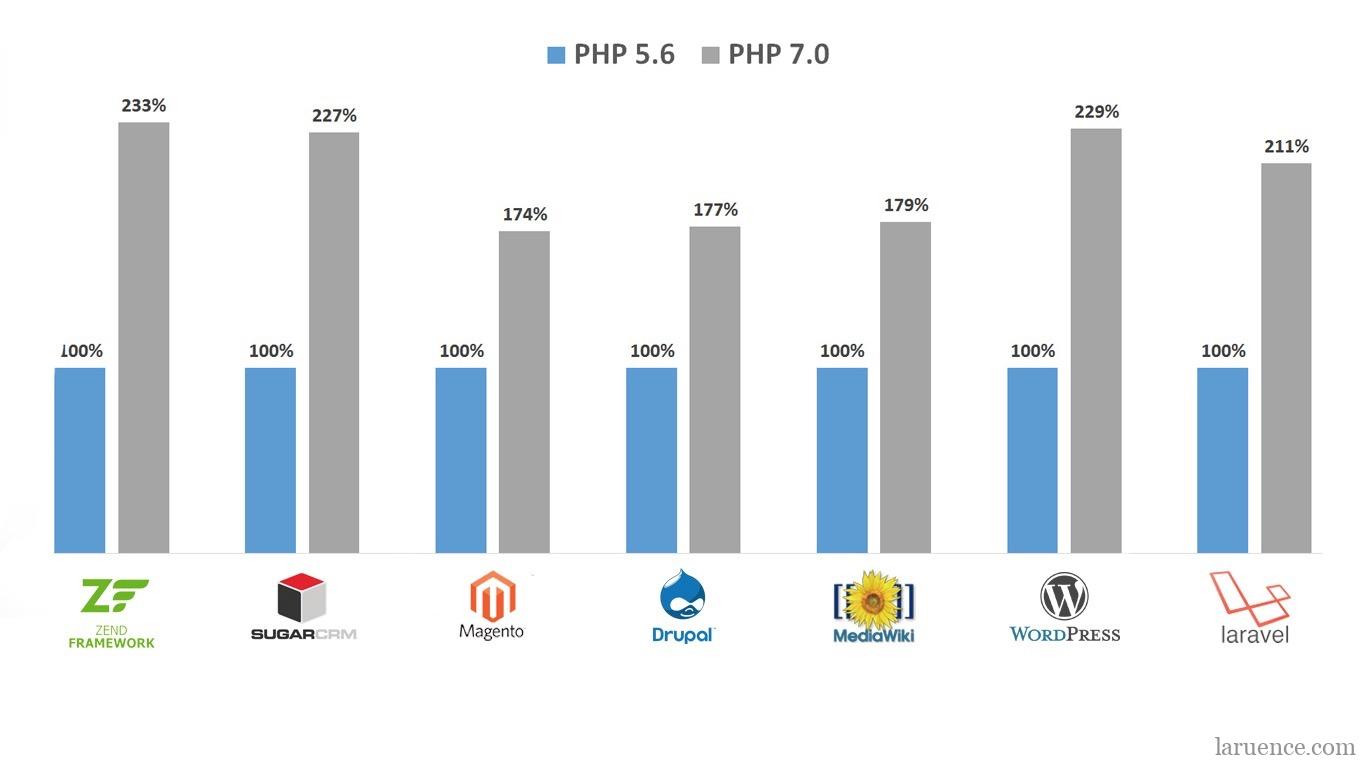
PHP 7 has been released. As the biggest release in PHP's history — a decade in the making and the biggest performance leap ever — PHP 7 shows a dramatic speedup in virtually every benchmark. But to get the most out of it, there are a few things I still want to call out.
1. Opcache
Make sure Zend Opcache is enabled. PHP 7 is faster than PHP 5.6 even without Opcache, so during the testing period there were certainly people running the comparisons with Opcache left off. Enabling it is trivial — add the following to your php.ini:
zend_extension=opcache.so
opcache.enable=1
opcache.enable_cli=1"
2. Use a newer compiler
Compile with a recent compiler — GCC 4.8 or later recommended. Only with GCC 4.8+ does PHP enable the "Global Register for opline and execute_data" optimization, which buys you roughly a 5% performance gain (measured in WordPress QPS).
Older GCC versions technically support this feature too, but we found their implementations were buggy, so the flag is only turned on for 4.8 and above.
3. HugePage
I covered this in an earlier post: 让你的PHP7更快之Hugepage. First enable HugePages at the system level, then turn on Opcache's huge_code_pages.
On my CentOS 6.5 box, for example:
$sudo sysctl vm.nr_hugepages=512
reserves 512 huge pages:
$ cat /proc/meminfo  | grep Huge
AnonHugePages:    106496 kB
HugePages_Total:     512
HugePages_Free:      504
HugePages_Rsvd:       27
HugePages_Surp:        0
Hugepagesize:       2048 kB
Then add this to php.ini:
opcache.huge_code_pages=1
With this in place, PHP backs its own text segment and its large memory allocations with huge pages, cutting TLB misses and improving performance.
4. Opcache file cache
Enable Opcache's file cache (experimental). This lets Opcache persist opcodes to files on disk, and for some workloads it delivers a very noticeable performance boost.
Add the following to php.ini:
opcache.file_cache=/tmp
PHP will then keep binary opcode exports under /tmp, which survive across PHP process lifetimes.
5. PGO
I also covered this in 让你的PHP7更快(GCC PGO). If your PHP installation serves a single dedicated project — say just your WordPress, or Drupal, or whatever — you can use PGO (profile-guided optimization) to tailor PHP specifically for that project.
Concretely, using WordPress 4.1 as the optimization target: when building PHP, start with:
$ make prof-gen
then train PHP with your project. For WordPress, that looks like:
$ sapi/cgi/php-cgi -T 100 /home/huixinchen/local/www/htdocs/wordpress/index.php >/dev/null
which runs WordPress's front page 100 times through php-cgi, generating profiling data along the way.
Finally:
$ make prof-clean
$ make prof-use && make install
The PHP 7 you end up with is now hand-tuned to its peak performance for your specific project.
That's all for now — I'll add more tips as they come to mind. Give these a try, thanks
Be First to Comment