- URL: https://www.laruence.com/en/2008/08/12/180.html
- Please include attribution when republishing.
SAPI: Server abstraction API. Anyone who has ever studied the PHP architecture knows how important this thing is — it provides an interface that lets PHP exchange data with other applications. This article will not go through every SAPI in PHP; it only looks at the simplest one, the CGI SAPI, to explain how the SAPI mechanism works.
First, let's look at the PHP architecture diagram:
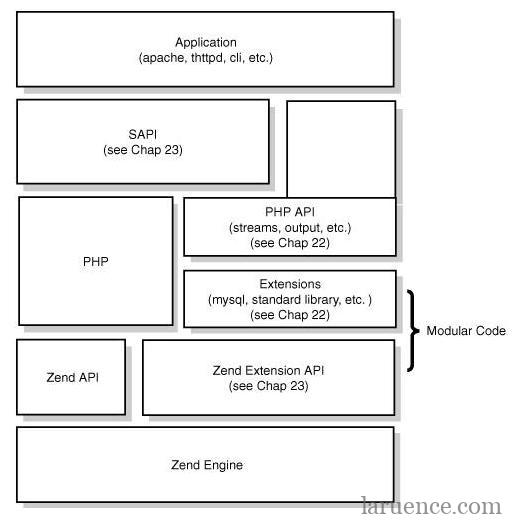
SAPI provides an interface for talking to the outside world. For PHP 5.2, quite a few SAPIs are provided out of the box: the common ones are mod_php5 for Apache, CGI, ISAPI for IIS, and the CLI for the shell. This article starts from the CGI SAPI to introduce the SAPI mechanism. CGI is simple, but don't worry — it covers the vast majority of the ground, and is enough to give you a deep understanding of how SAPI works.
To define a SAPI, the first thing you need is a sapi_module_struct. Have a look at PHP-SRC/sapi/cgi/cgi_main.c:
 */
static sapi_module_struct cgi_sapi_module = {
#if PHP_FASTCGI
    "cgi-fcgi",                     /* name */
    "CGI/FastCGI",                  /* pretty name */
#else
    "cgi",                          /* name */
    "CGI",                          /* pretty name */
#endif
    php_cgi_startup,                /* startup */
    php_module_shutdown_wrapper,    /* shutdown */
    NULL,                           /* activate */
    sapi_cgi_deactivate,            /* deactivate */
    sapi_cgibin_ub_write,           /* unbuffered write */
    sapi_cgibin_flush,              /* flush */
    NULL,                           /* get uid */
    sapi_cgibin_getenv,             /* getenv */
    php_error,                      /* error handler */
    NULL,                           /* header handler */
    sapi_cgi_send_headers,          /* send headers handler */
    NULL,                           /* send header handler */
    sapi_cgi_read_post,             /* read POST data */
    sapi_cgi_read_cookies,          /* read Cookies */
    sapi_cgi_register_variables,    /* register server variables */
    sapi_cgi_log_message,           /* Log message */
    NULL,                           /* Get request time */
    STANDARD_SAPI_MODULE_PROPERTIES
};
This structure holds a few constants, such as name, which is used when we call php_info(). Then come some initialization and shutdown functions, plus a set of function pointers that tell Zend how to fetch and how to output data.
   static int php_cgi_startup(sapi_module_struct *sapi_module)
{
    if (php_module_startup(sapi_module, NULL, 0) == FAILURE) {
        return FAILURE;
    }
    return SUCCESS;
}
  static int sapi_cgi_deactivate(TSRMLS_D)
{
    /* flush only when SAPI was started. The reasons are:
        1. SAPI Deactivate is called from two places: module init and request shutdown
        2. When the first call occurs and the request is not set up, flush fails on
            FastCGI.
    */
    if (SG(sapi_started)) {
        sapi_cgibin_flush(SG(server_context));
    }
    return SUCCESS;
}
static inline size_t sapi_cgibin_single_write(const char *str, uint str_length TSRMLS_DC)
{
#ifdef PHP_WRITE_STDOUT
    long ret;
#else
    size_t ret;
#endif
#if PHP_FASTCGI
    if (fcgi_is_fastcgi()) {
        fcgi_request *request = (fcgi_request*) SG(server_context);
        long ret = fcgi_write(request, FCGI_STDOUT, str, str_length);
        if (ret <= 0) {
            return 0;
        }
        return ret;
    }
#endif
#ifdef PHP_WRITE_STDOUT
    ret = write(STDOUT_FILENO, str, str_length);
    if (ret <= 0) return 0;
    return ret;
#else
    ret = fwrite(str, 1, MIN(str_length, 16384), stdout);
    return ret;
#endif
}
static int sapi_cgibin_ub_write(const char *str, uint str_length TSRMLS_DC)
{
    const char *ptr = str;
    uint remaining = str_length;
    size_t ret;
    while (remaining > 0) {
        ret = sapi_cgibin_single_write(ptr, remaining TSRMLS_CC);
        if (!ret) {
            php_handle_aborted_connection();
            return str_length - remaining;
        }
        ptr += ret;
        remaining -= ret;
    }
    return str_length;
}
The real write logic is split out into its own function purely so that the FastCGI-compatible write path is easy to support.
static char *sapi_cgibin_getenv(char *name, size_t name_len TSRMLS_DC)
{
#if PHP_FASTCGI
    /* when php is started by mod_fastcgi, no regular environment
       is provided to PHP.  It is always sent to PHP at the start
       of a request.  So we have to do our own lookup to get env
       vars.  This could probably be faster somehow.  */
    if (fcgi_is_fastcgi()) {
        fcgi_request *request = (fcgi_request*) SG(server_context);
        return fcgi_getenv(request, name, name_len);
    }
#endif
    /*  if cgi, or fastcgi and not found in fcgi env
        check the regular environment */
    return getenv(name);
}
static int sapi_cgi_send_headers(sapi_headers_struct *sapi_headers TSRMLS_DC)
{
    char buf[SAPI_CGI_MAX_HEADER_LENGTH];
    sapi_header_struct *h;
    zend_llist_position pos;
    if (SG(request_info).no_headers == 1) {
        return  SAPI_HEADER_SENT_SUCCESSFULLY;
    }
    if (cgi_nph || SG(sapi_headers).http_response_code != 200)
    {
        int len;
        if (rfc2616_headers && SG(sapi_headers).http_status_line) {
            len = snprintf(buf, SAPI_CGI_MAX_HEADER_LENGTH,
                           "%srn", SG(sapi_headers).http_status_line);
            if (len > SAPI_CGI_MAX_HEADER_LENGTH) {
                len = SAPI_CGI_MAX_HEADER_LENGTH;
            }
        } else {
            len = sprintf(buf, "Status: %drn", SG(sapi_headers).http_response_code);
        }
        PHPWRITE_H(buf, len);
    }
    h = (sapi_header_struct*)zend_llist_get_first_ex(&sapi_headers->headers, &pos);
    while (h) {
        /* prevent CRLFCRLF */
        if (h->header_len) {
            PHPWRITE_H(h->header, h->header_len);
            PHPWRITE_H("rn", 2);
        }
        h = (sapi_header_struct*)zend_llist_get_next_ex(&sapi_headers->headers, &pos);
    }
    PHPWRITE_H("rn", 2);
    return SAPI_HEADER_SENT_SUCCESSFULLY;
   }
static int sapi_cgi_read_post(char *buffer, uint count_bytes TSRMLS_DC)
{
    uint read_bytes=0, tmp_read_bytes;
#if PHP_FASTCGI
    char *pos = buffer;
#endif
    count_bytes = MIN(count_bytes, (uint) SG(request_info).content_length - SG(read_post_bytes));
    while (read_bytes < count_bytes) {
#if PHP_FASTCGI
        if (fcgi_is_fastcgi()) {
            fcgi_request *request = (fcgi_request*) SG(server_context);
            tmp_read_bytes = fcgi_read(request, pos, count_bytes - read_bytes);
            pos += tmp_read_bytes;
        } else {
            tmp_read_bytes = read(0, buffer + read_bytes, count_bytes - read_bytes);
        }
#else
        tmp_read_bytes = read(0, buffer + read_bytes, count_bytes - read_bytes);
#endif
        if (tmp_read_bytes <= 0) {
            break;
        }
        read_bytes += tmp_read_bytes;
    }
    return read_bytes;
}
static char *sapi_cgi_read_cookies(TSRMLS_D)
{
    return sapi_cgibin_getenv((char *) "HTTP_COOKIE", sizeof("HTTP_COOKIE")-1 TSRMLS_CC);
}
static void sapi_cgi_register_variables(zval *track_vars_array TSRMLS_DC)
{
    /* In CGI mode, we consider the environment to be a part of the server
     * variables
     */
    php_import_environment_variables(track_vars_array TSRMLS_CC);
    /* Build the special-case PHP_SELF variable for the CGI version */
    php_register_variable("PHP_SELF", (SG(request_info).request_uri ? SG(request_info).request_uri : ""), track_vars_array TSRMLS_CC);
}
static void sapi_cgi_log_message(char *message)
{
#if PHP_FASTCGI
    if (fcgi_is_fastcgi() && fcgi_logging) {
        fcgi_request *request;
        TSRMLS_FETCH();
        request = (fcgi_request*) SG(server_context);
        if (request) {
            int len = strlen(message);
            char *buf = malloc(len+2);
            memcpy(buf, message, len);
            memcpy(buf + len, "n", sizeof("n"));
            fcgi_write(request, FCGI_STDERR, buf, len+1);
            free(buf);
        } else {
            fprintf(stderr, "%sn", message);
        }
        /* ignore return code */
    } else
#endif /* PHP_FASTCGI */
    fprintf(stderr, "%sn", message);
}
With that analysis, we now understand how a SAPI is implemented. And having gone through CGI, you can imagine how the mod_php, embed and other SAPIs are implemented. 🙂
That's all for today. Spain and China went into overtime, hehe, the Chinese men's basketball team isn't bad at all......
Be First to Comment