- URL: https://www.laruence.com/en/2011/02/13/1870.html
- Please include attribution when republishing.
You may have noticed that when using ECHO in PHP to output large chunks of string, the execution time is noticeably longer, which leads some to think PHP's ECHO is slow.
In my earlier article, I already explained the reason, and also hope to correct the misconception that "PHP's ECHO is slow."
However that earlier article only gave the reason; it didn't introduce how to avoid the problem. Today, in one of our company's product lines (Apache with PHP), we found an issue: a user was firing off a large number of download requests in a short time, which caused the number of HTTP connections and database connections to spike.
The reason the database connections spiked is that the DB connection is held in a single-threaded manner and is only released when request processing ends. So the problem is: if request processing takes too long, a large number of database connections accumulate.
And this user's network was slow, meaning ECHO's "performance" is poor~ and the download takes a long time~. As shown below:
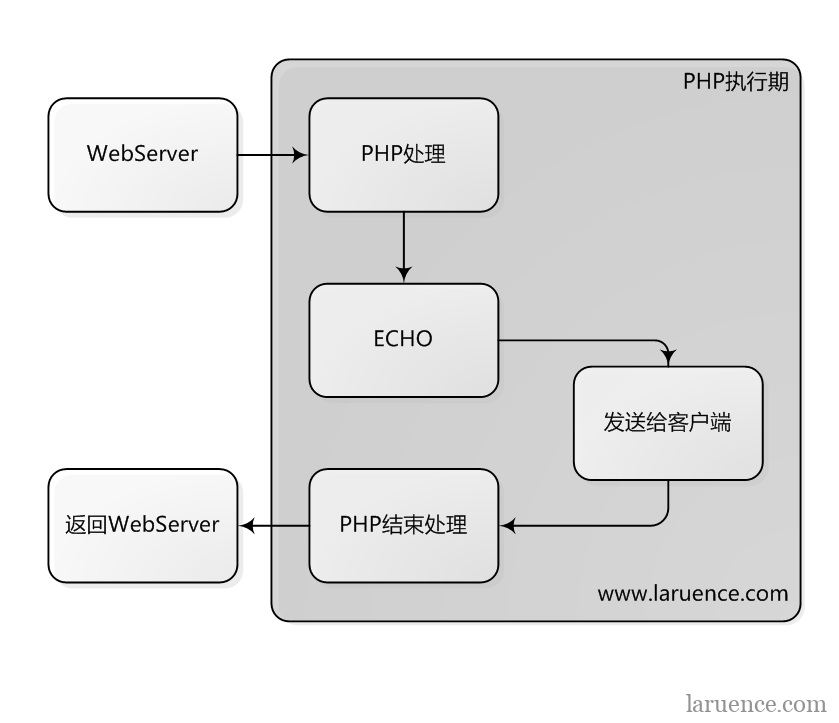
This leads to the topic I want to discuss today: how to make ECHO faster, so that PHP's request processing ends as soon as possible...
We know that ECHO is slow because it's waiting for "writing the data" to return successfully. So a relatively simple approach is to turn on output buffering:
edit php.ini
output_buffering = 4096 //bytes
Of course, you can also explicitly call ob_start() in the script:
ob_start();
echo $huge_string;
//other logic.
ob_end_flush();
Here, there's a point to note: ob_start opens a 4096-sized buffer, so if huge_string is larger than 4096, it won't help speed things up.
Now our ECHO will "instantly" succeed and return, because the data is temporarily written into our output buffer. If the buffer is large enough, the content won't be sent to the client until the very end of the script (strictly speaking, sent to the WebServer).
But this still doesn't solve the problem we hit today, because these data still ultimately have to be sent to the client by PHP (not considering the WebServer's output buffer here), and until that process ends the request won't close and PHP won't run the DB destructor.
So, since we're daydreaming anyway, let's dream a bit bigger. We can use Apache's output buffering. I.e. change to the following execution flow:
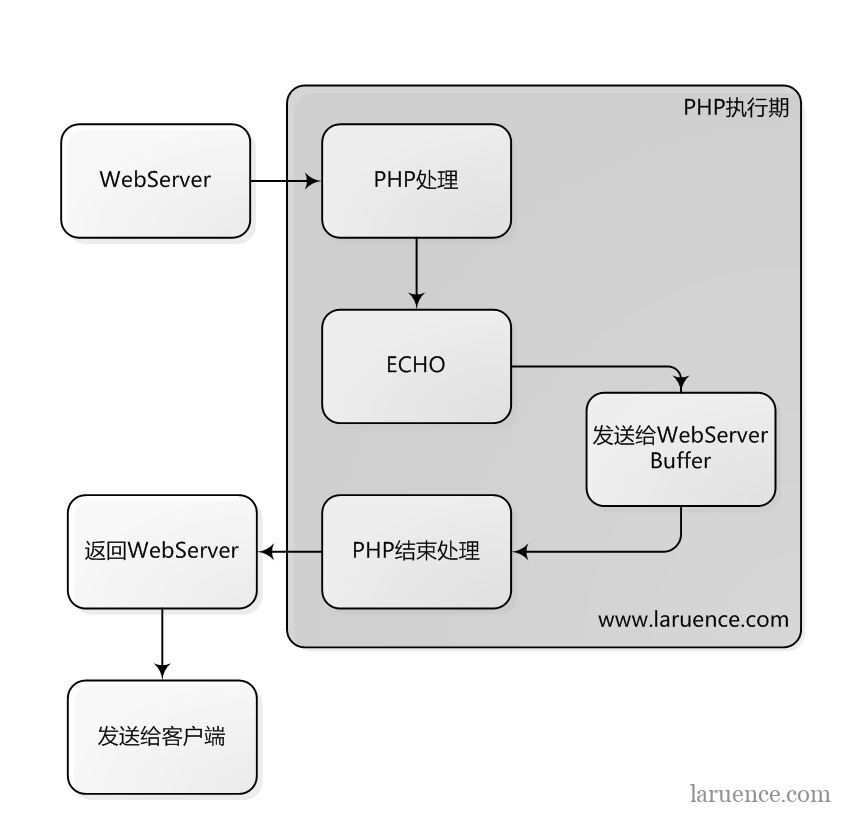
Suppose our PHP needs to output 100K of data. Then our Apache's output buffer must be larger than 100K, otherwise once Apache's output buffer is full it will truly send to the client, and during that process the ECHO currently executing will block and wait.
So, how to modify Apache's output buffer? We can use the SendBufferSize directive in the apache config file:
SendBufferSize 4096 //note it's in bytes
For the details of SendBufferSize, see http://httpd.apache.org/docs/2.0/en/mod/mpm_common.html#sendbuffersize
Note: for other webservers in php-cgi mode, consult the relevant webserver's manual to find a similar setting.
Now, PHP's ECHO will hand the content directly to Apache. After PHP finishes executing, it no longer waits for the content to be fully sent to the client, and exits directly. The content is then sent to the client by Apache after PHP has finished processing, thus accelerating ECHO's execution.
One aside: printf, print, file_put_contents("php://output")... etc. are all the same as ECHO.
Finally, to be clear: doing this only shifts the waiting time that used to belong to ECHO over to Apache; it does not actually reduce the time the client takes to receive the content. It only accelerates PHP's processing, bringing PHP's exit earlier, thereby reducing how long PHP holds resources and indirectly increasing resource utilization.
Be First to Comment