- URL: https://www.laruence.com/en/2013/03/18/2846.html
- Please include attribution when republishing.
Haven't updated the blog for a long time — work has been really busy this past year..... anyway, today there's finally something new to share with everyone.
This idea comes from a very simple thought, plus an opportunity that recently came up. Let's talk about the opportunity first.
In the past, a lot of people chose to use APC. Besides the Opcode Cache, APC also provides a User Data Cache (apc_store/apc_fetch), so for many who needed a User Data Cache, APC just worked fine.
However, recently Zend Optimizer Plus was open-sourced. Testing shows that, because of its Opcode Cache optimizations, Zend O+ is more efficient than APC for opcode caching. And since PHP 5.5, Zend O+ has been part of the PHP source and ships with PHP.
This creates a problem: for those who want both Zend O+'s Opcode Cache and APC's User Data Cache, what do they do?
At first, I just added a switch to APC — apc.opcode_cache_enable. That way, users could use APC with the opcode cache turned off to achieve this. But APC's User Data Cache uses the same storage mechanism as the Opcode Cache, which in this scenario demands strict data correctness, so there are a lot of locks. Testing shows APC's User Data Cache performs about the same as a local memcached.
So this idea came to mind: develop a separate, shared-memory-based, high-performance User Data Cache to satisfy:
- 1. I just want to share some simple data between PHP processes
- 2. I want to cache page results very efficiently
Okey, then what to call it? Hehe, considering my earlier Yaf and Yar, naturally it's called Yac, 🙂
Back to the point — let's talk about the design of this lock-free shared-memory cache. First, the design is based on these empirical assumptions:
- 1. For an application, the values behind the same cache key are almost the same size.
- 2. The number of distinct key names is finite.
- 3. Cache reads are far more frequent than writes.
- 4. A cache is not a database — even if the cache is lost, it won't cause a fatal error.
- 5. A typical usage scenario looks like:
<?php
    if (!($data = cache_fetch($key))) {
         /* no cache */
         $data =  fetch data from API/database();
         cache_set($key, $data);
    }
?>
Good. Based on these assumptions, let's see how to implement Yac. The most common cache operation is reading — can we make reads lock-free?
Easy: a lock-free read fetches the data and then validates it. If the validation succeeds, the lookup succeeded; otherwise, treat it as a miss. This is a common technique of trading CPU for locks. On today's servers, most are multi-core, and locking would be a huge waste of CPU.
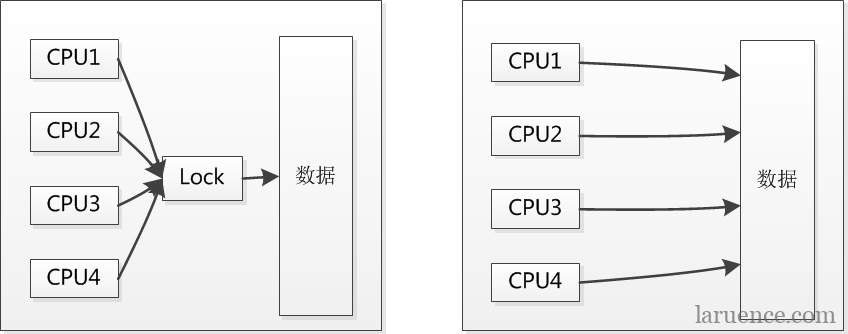
So instead of leaving those CPUs idle, let everyone read at the same time — worst case, we just do one extra data validation on the way back (Yac uses a crc check).
Okey, the read side is easy to solve, but what about the write side? Let's first look at Yac's shared-memory allocation model:
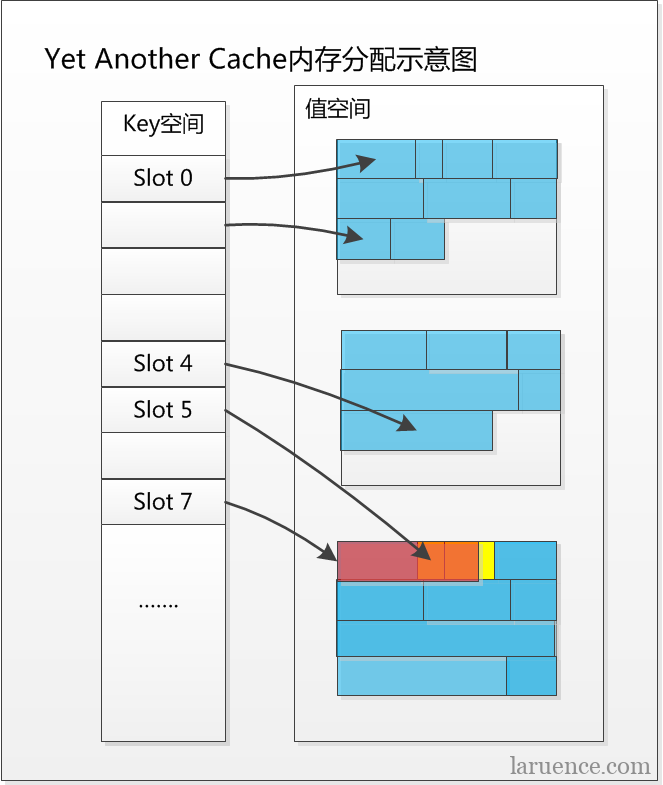
The key space has a fixed size determined at startup, based on assumption (2) above. By default (on 64-bit Linux), Yac allocates 32768 Key Slots — meaning you can store at most 32768 distinct cache values. Of course, you can tune this with yac.keys_memory_size; if you set yac.keys_memory_size to 32M, you'll get 262144 Key Slots.
Yac uses double hashing to resolve hash collisions. The preferred hash function is the popular MurmurHash.
The shared memory is divided into as many small chunks of a fixed size as possible — the default is 4M per chunk. Then, based on the key's hash, the value decides which chunk to allocate space in, reducing potential conflicts on writes.
And when allocating large chunks, you only need to move a single segment->pos pointer — just one addition — which reduces conflicts when multiple processes allocate from the same chunk simultaneously.
So, what if a real conflict happens? Say process A requested 40 bytes and process B requested 60 bytes, but pos only advanced by 60 bytes. There are several cases:
1. A finished writing its data and returned success, then B also finished writing and returned success. In the end, B's cache landed, while A's was evicted.
2. B finished writing and returned success, then A also finished writing and returned success. In the end, A's cache landed, and B's was evicted.
3. A wrote half, B wrote half, then A wrote half again, B wrote half again — both returned success — but in the end, both cache entries are invalid.
You can see that the worst outcome is that both A's and B's caches are lost. But Yac will never return bad data to users. The next time a lookup happens, thanks to the crc check, both will simply miss.
Given assumptions (3), (4), and (5) above, okey, not a big deal, right? No worries — let it be wrong, hehe.
Then, what happens when memory is full? Look at the memory allocation diagram above again — notice the red part?
When a new key arrives, Yac tries to find a suitable Key Slot. If it finds a key with the same name, it immediately checks the old key's value memory size. Given assumption (1), and since Yac intentionally over-allocates some memory when allocating, with high probability you don't need to re-allocate — you just write the new data on top of the existing memory.
But what if the existing memory isn't enough? Then allocate some.
At this point, suppose memory is fully allocated. Yac then resets pos on the chosen chunk and starts allocating from the beginning. Notice the red part in the diagram — that's the newly written data. And the yellow part is the region whose cache became invalid because of the new writes. In other words, it won't cause a large amount of cache invalidation.
What if there aren't enough Key Slots?
Yac starts from the target Key Slots, follows the hash path to pick 5 key slots, and evicts one according to LRU.
So, how does this cache actually perform? I ran a simple test comparing it with APC (ab -n 10000 -c 50). The test script:
Yac:
<?php
$yac = new Yac();
for ($i = 0; $i<1000; $i++) {
    $key =  "xxx" . rand(1, 10000);
    $value = str_repeat("x", rand(1, 10000));
    if (!$yac->set($key, $value)) {
        var_dump("write " . $i);
    }
    if ($value != ($new = $yac->get($key))) {
        var_dump("read " . $i);
    }
}
var_dump($i);
APC:
<?php
for ($i = 0; $i<1000; $i++) {
    $key =  "xxx" . rand(1, 10000);
    $value = str_repeat("x", rand(1, 10000));
    if (!apc_store($key, $value)) {
        var_dump("write " . $i);
    }
    if ($value != ($new = apc_fetch($key))) {
        var_dump("read " . $i);
    }
}
var_dump($i);
Final results:
Yac
Write errors:           0
Total transferred:      597358 bytes
HTML transferred:       368358 bytes
Requests per second:    359.69 [#/sec] (mean)
Time per request:       139.010 [ms] (mean)
Time per request:       2.780 [ms] (mean, across all concurrent requests)
Transfer rate:          209.83 [Kbytes/sec] received
APC's:
Write errors:           0
Total transferred:      7050591 bytes
HTML transferred:       6828577 bytes
Requests per second:    46.79 [#/sec] (mean)
Time per request:       1068.502 [ms] (mean)
Time per request:       21.370 [ms] (mean, across all concurrent requests)
Transfer rate:          322.20 [Kbytes/sec] received
Alright, that's the main idea. Now let's talk about Yac's limitations:
1. The key length must not exceed 48 characters. (I think that should meet everyone's needs; if you really need long keys, MD5 them first and then store.)
2. The maximum value length is 64M, and the compressed length must not exceed 1M.
3. When memory runs out, Yac has a noticeably higher eviction rate, so if you're going to use Yac, give it as much memory as you can.
Thanks to @cydu, @cunsheng, @rodin, @the immortal's cat _ Song Q and others for their suggestions.
Finally, Yac's code has been uploaded to github: Yac, but it's still in the polishing stage and doesn't support Windows yet. I'll keep improving it. If you're interested, you can try it early — and I'd especially appreciate anyone who helps find bugs and do some optimizations. Thanks 🙂
Be First to Comment