- URL: https://www.laruence.com/en/2026/08/26/6566.html
- Please include attribution when republishing.
Background
A few days ago I switched my blog's object cache to wp-yac-cache, my new WordPress plugin, replacing the Memcached setup I'd run for over a decade. Benchmark conclusion: ~19% more throughput under identical conditions.
After running it for a few days, I noticed the keys memory area was growing unusually fast. I dug into what was actually stored in there and found a few problems:
-
The bulk came from two kinds of empty arrays: one kind is WordPress's search negative cache — search a keyword with no results and WP still caches the empty result to avoid hitting the DB next time.
-
Mixed into those empty search caches was a special breed of visitor: search-poisoning bots hammer your site search with all kinds of junk sensitive keywords, purely to trick search engines into indexing the result pages — every query leaves one more negative-cache entry nobody will ever read.
-
I use Akismet for anti-spam comments. It has a cron called
akismet_schedule_cron_recheck: comments the API couldn't classify (or that errored) go into a "recheck" queue; each cron run takes up to 100 of them and resubmits them to Akismet one by one. During rechecking it repeatedly adds and removes a batch of comment meta per comment —akismet_rechecking,akismet_error, the append-onlyakismet_history, and so on. All of these enter the object cache keyed by "comment × meta key", and nine times out of ten the recheck queue is full of spam — after checking there's nothing worth keeping, so what lands in the cache is empty array after empty array.
Yac's keys area is fixed-size, and it being full is actually fine — after a few failed probes it evicts an old entry LRU-style and the new one moves in. But the values memory area is affected: although nobody reads these empty arrays, every set still dutifully allocates a block in the values area and writes to it. Keep writing like that and the values segment will eventually wrap around and start recycling, overwriting data you actually use — and then come the misses.
A cache full of data nobody reads, taking up the memory and squeezing out data people do read — that doesn't feel right.
Inspiration
Then, while driving the day before yesterday, it hit me: these small things — empty arrays, false, null, small integers — why must they be written to the values area at all? The slot already has a field holding the pointer to the value; pointers are 8-byte aligned, so the low 3 bits are always 0, naturally idle. Why not encode the value directly into that pointer word? They would never keep writing to values memory again; worst case you get a few more evictions, and data people actually read is unaffected.
That became the biggest change in 2.4.0: embedded values.
Embedded: small values skip the values area
Values meeting any of the following are no longer allocated in the values area; they're encoded directly into the slot's val field:
NULL/true/false- Small integers
- Strings up to 7 bytes (64-bit platforms)
- Empty arrays
The implementation uses the low 3 bits of the pointer word as a type tag and the high bits as payload. On read, one look at the slot yields the value — no dereference, no trip into the values area, no copy. It occupies zero values memory, so it can never be squeezed out by recycling.
One allocation saved, one copy saved, one class of misses eliminated — a win on every front.
For WordPress this change is tailor-made: all those empty arrays mentioned above (search negative caches, empty comment lists) go embedded, zero cost to the values area. In the plugin I built a dedicated WP_YAC_SKIP_EMPTY switch to keep empty negative caches out of shared memory — after 2.4.0 that filter is basically unnecessary; let them in, they're no longer a burden.
LZ4 replaces FastLZ
Yac's compression has always used FastLZ. That library is ancient and essentially unmaintained. 2.4.0 switches to LZ4: much faster decompression, better compression ratio, active maintenance.
By default the LZ4 source is compiled in directly (it's a single .c file, zero dependencies); to use the system library instead, configure --with-system-lz4.
For values large enough to trigger compression (like alloptions, tens of KB), decompression speed on a hit directly determines read latency, and this replacement shows up very clearly in the benchmarks — numbers in the performance section below.
get() now supports $default
Two long-standing annoyances:
-
On a miss,
get()returnsfalse— but what if the cached value itself isfalse? Indistinguishable. So everyone just avoids cachingfalse. -
The
get()signature always reserved a second parameter slot, originally intended for CAS (compare-and-swap), which Yac never implemented — it just hung there empty.
2.4.0 puts that slot to use as $default:
$yac->get("missing");          // false (behavior unchanged when $default is not passed)
$yac->get("missing", []);      // []
$yac->get("missing", false);   // false — but now unambiguously "miss, here's your default"
Multi-key get() behavior changed along with it: missing keys used to be padded with a placeholder false; now missing keys are simply not returned (or filled with $default if you passed one). No more guessing whether a returned false means "no such entry" or "the entry is false".
From now on, to distinguish "miss" from "value is false", you can simply write:
if (($v = $yac->get("maybe_false", "__NONE_EXISTS")) === "__NONE_EXISTS") {
    // miss
} else {
    // hit, $v is the cached value
}
On a miss the sentinel comes back untouched; one strict === comparison settles it.
dump() gains $offset
dump() is my own debugging/analysis tool — it pours out every entry in shared memory. But if you allocated a lot of memory and have hundreds of thousands of entries, a single dump(-1) (no limit) pours out everything, and the returned array alone can blow up a single PHP process's memory.
So 2.4.0 adds $offset for pagination:
$entries = $yac->dump(100, 500); // 100 entries starting at #500
Every entry keeps its books: hits / atime / c_len
This release also adds per-entry metadata, all visible in dump():
- hits — how many times this entry has been hit
- atime — time of last access
- c_len — compressed length at storage time (for compressed entries)
- embedded — whether it's in the embedded form described above
What are these for? Analyzing what your cache is actually doing. For example, alloptions is the largest entry but also the most-hit one — worth it. Conversely, an entry with hits stuck at 0 and atime frozen at write time is write-only garbage; consider not caching it. The content distribution and Largest entries rankings in my plugin's admin panel are powered by exactly these fields.
For instance, clicking into an entry in the panel shows its full books — here's a real cache entry from this blog:
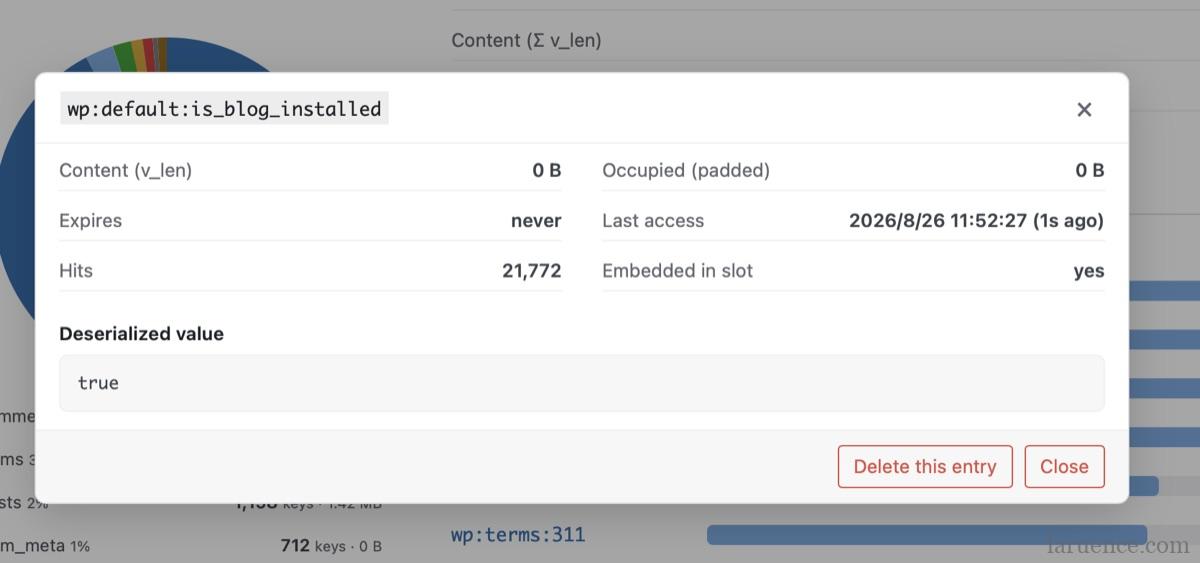
is_blog_installed — read 20,000+ times, accessed 1 second ago, embedded in its slotOver 20k hits, last access 1 second ago, embedded in the slot — a textbook hot entry, absolutely worth caching. You can apply the same lens to your own cache and see who's pulling weight and who's freeloading.
One detail: hits resets to zero on overwrite; it does not inherit the old value's heat. I originally wanted to inherit it, but in the lock-free design, reading the old block's counter while writing a new one has a very narrow tearing window. After weighing the trade-off, I gave up on it: hits/atime are advisory only; even a wrong value does little harm. Keeping "new value, fresh heat" semantics is simple and the implementation stays clean.
Performance
16-worker shared-memory benchmark (average of 3 runs), against 2.3.1:
| Scenario | Metric | 2.3.1 | 2.4.0 | Gain |
|---|---|---|---|---|
| Small values (embedded) | get | 3.9M ops/s | 6.3M ops/s | +64% |
| Small values (embedded) | set | 6.4M ops/s | 7.2M ops/s | +12% |
| Mixed (60% embedded / 40% serialized) | get | 2.3M ops/s | 4.0M ops/s | +70% |
| Mixed | set | 4.2M ops/s | 5.8M ops/s | +39% |
| Compressed values (LZ4 vs FastLZ) | get | 1.0M ops/s | 3.6M ops/s | ~3.5x |
The biggest winner is embedded: every get used to dereference a pointer into the values area and copy; now the entire read happens inside the slot. The compressed-values row is LZ4's doing.
One more end-to-end reference (16 workers, 100:1 read/write ratio, mixed value sizes):
| Backend | ops/s |
|---|---|
| Yac | ~27M |
| APCu | 1.2M |
| Memcached | 98K |
Of course, this is peak throughput, not a promise — your machine and your workload profile will produce your own numbers.
Real-world performance
After upgrading, honest answer first: in page speed, I see no obvious change. That's not surprising: the dereference and copy saved by embedded are microsecond-level optimizations; inside a ~140ms page they're below the noise floor. The +64% / +70% numbers in the benchmark table measure the gap when you "hammer the cache directly".
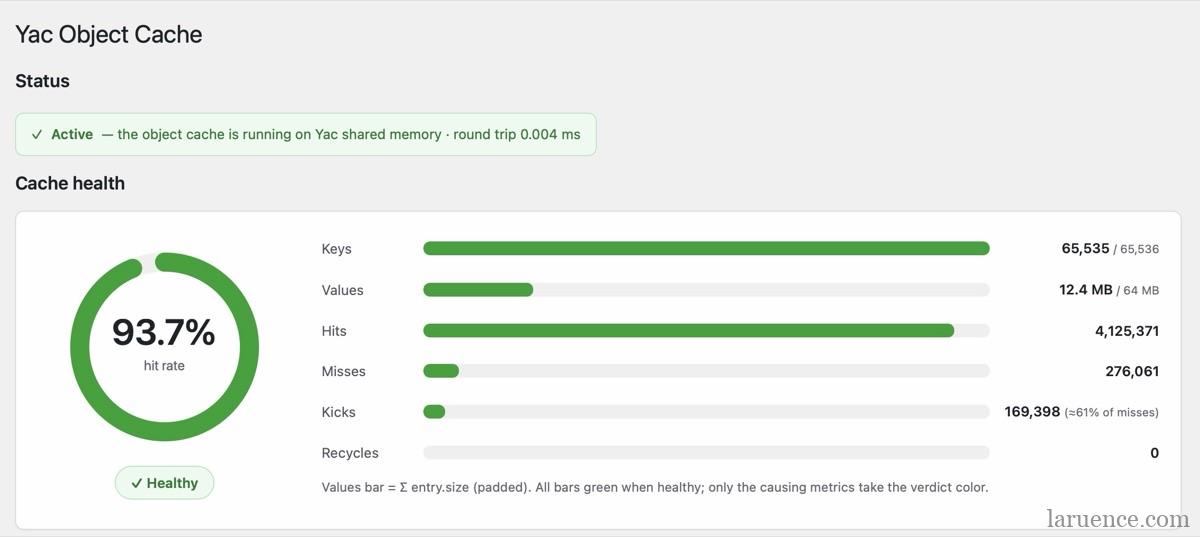
The visible win is memory. After a day on my own blog, Yac's memory footprint dropped from 23.5M to 12.4M — almost entirely thanks to embedded. Empty arrays no longer each take a block of memory, and Recycles on the panel is back to 0: the values area has never wrapped around since.
Upgrading
pecl upgrade yac

# or
pie install laruence/yac

# or from source
git clone https://github.com/laruence/yac.git && cd yac
phpize && ./configure && make && sudo make install
Windows DLLs are on the releases page: https://github.com/laruence/yac/releases.
Finally
If you're using it as WordPress's object cache, how should you size the memory? For my site — 300 posts — 8M keys + 32M values is plenty:
yac.keys_memory_size = 8M     ; roughly 65k slots
yac.values_memory_size = 32M
How are those numbers derived?
keys: each slot struct is 88 bytes, but the slot count is rounded down to a power of two by the hash mask, which works out to ~128 bytes per slot — 4M ≈ 32k slots, 8M ≈ 65k, 16M ≈ 130k, 32M ≈ 260k. Just look at how many distinct keys your app uses per day (Total entries on the panel, or count via dump()): a normal blog has a few thousand, so 8M is ample; for sessions or per-user caches with hundreds of thousands to millions of distinct keys, go up to 32M or 64M.
values: size it to your "live content" — actual footprint per value ≈ content size × 1.25 (storage buffer factor) + a 24-byte header. On a WordPress site the largest entry is usually alloptions (tens of KB); the rest are post meta and comment lists — a small-to-mid site totals a few MB, and after 2.4.0 empty values no longer enter the values area, so there's even more headroom. Note the minimum unit for values is 4M (one segment); setting it smaller degrades to a single segment. 32M is plenty for real content like blog posts; if you cache large HTML blobs or whole serialized tables, multiply by your own content scale.
A safety margin: estimate keys at 2× your distinct-key count; fill values with one full round of hot data plus 50% headroom. Slightly undersized is fine — full keys evict old entries, full values wrap around; nothing crashes, you just eat more misses.
In summary, for WordPress you can crudely set values memory = 4× keys memory.
If your blog still runs on WordPress, consider switching the object cache to Yac — it's one extension plus one plugin, the performance gain is instant, you no longer maintain a Memcached service, and memory usage drops too. My own blog has been running it for over a week with no issues. 😄
Be First to Comment