- URL: https://www.laruence.com/en/2026/08/20/6420.html
- Please include attribution when republishing.
This blog ran on Memcached for many years. It was stable and never caused trouble, but one thing was unavoidable: every cache read in PHP went through localhost TCP. Connection management, protocol encoding/decoding, data round-trips — the per-call cost is small, but rendering a WordPress page often means tens or even hundreds of object-cache reads, and they add up.
More importantly, this cost has nothing to do with cache hit rate. Even on a hit, you pay the full trip.
Yac (Yet Another Cache) takes a different route. It keeps the cache in shared memory created by the PHP-FPM master; forked workers access it directly — no separate cache service, no sockets.
Since WordPress has a standard Object Cache API, I wanted to find out: swapping Memcached for Yac — how much does it actually save?
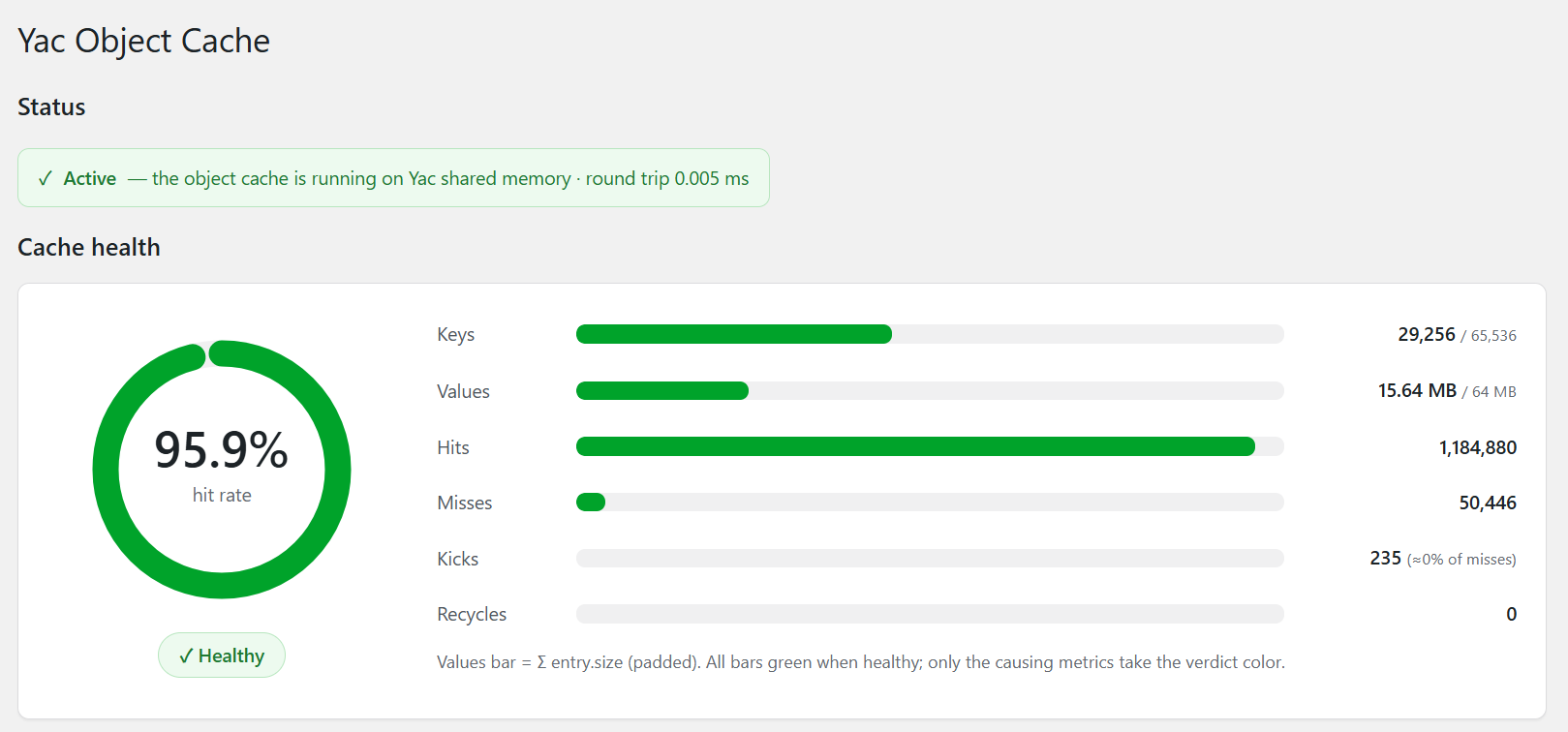
That's how WP Yac Object Cache came about. It ships a standard object-cache.php drop-in that deploys automatically on activation, plus an admin panel for hit rate, memory usage and eviction stats.
How much faster, really?
The benchmark uses this blog's homepage directly — no blank test site or synthetic page. The server has an 8-core CPU, 31GB RAM, running PHP 8.1 FPM and Nginx. Memcached is reached via localhost:11211; Yac uses WP Yac v1.0.0.
To keep the two setups as symmetric as possible, each round only swaps the Object Cache drop-in; everything else stays put. Before testing: wp cache flush, restart PHP-FPM, warm up with 500 requests, then run 30-second sustained load at 20, 50 and 100 concurrency.
| Concurrency | Yac RPS | Memcached RPS | Gain | Yac p50 | Mem p50 | Yac p95 | Mem p95 |
|---|---|---|---|---|---|---|---|
| 20 | 141.6 | 118.7 | +19.3% | 139ms | 167ms | 192ms | 216ms |
| 50 | 140.6 | 118.5 | +18.6% | 353ms | 420ms | 407ms | 465ms |
| 100 | 142.1 | 118.4 | +20.1% | 699ms | 840ms | 754ms | 886ms |
Each tier completed 3,500–4,200 full page renders, all HTTP 200, zero failed requests.
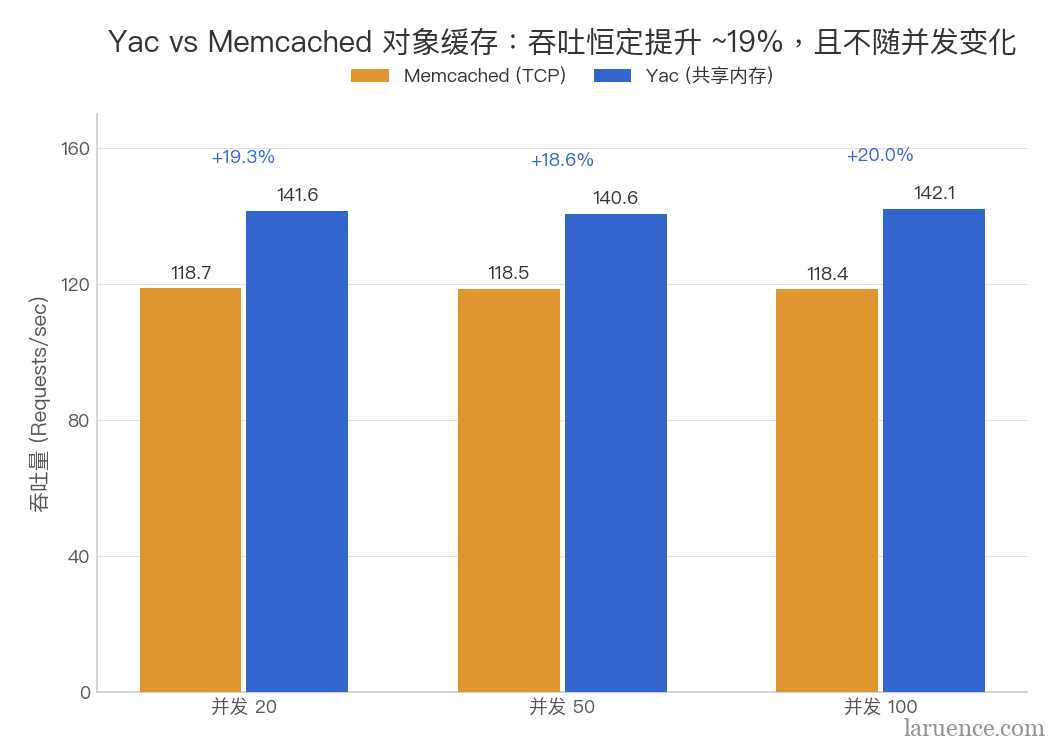
At all three levels Yac sustains ~140 RPS while Memcached sits at ~118 RPS — a very stable gap. Re-running with a fixed request count (ab -n 10000 -c 100) gives similar numbers: Yac 141.8 RPS vs Memcached 120.6 RPS, +17.6%.
This obviously doesn't mean every WordPress site gains 19% by switching to Yac. Themes, plugins, database load and the number of cache reads per request all vary, so the payoff varies. But on this blog, the difference reproduces consistently.
Where does the 19% come from?
Yac's edge isn't a higher hit rate — it's a shorter path to the data after a hit.
Memcached's call path is roughly:
PHP → Socket → Memcached → Socket → PHP
Yac's is:
PHP → Shared Memory
One access saves only a little, hardly observable. But generating a WordPress page reads options, terms, post meta, comments and more, over and over. Across tens to hundreds of accesses, the saved socket traffic and protocol handling become a measurable difference.
The test also shows something else: past ~140 RPS, adding concurrency no longer raises Yac's throughput. By then the bottleneck has shifted to PHP page rendering and MySQL. Going from 20 to 100 concurrency, p50 latency climbs from 139ms to 699ms — essentially queueing after throughput saturation.
So this optimization removes the fixed per-request cost of hammering the object cache; it doesn't dissolve every bottleneck on the site. To push the ceiling further, the next steps are OPcache, page caching or horizontal scaling — not more object-cache tuning.
Installation
First install the Yac extension for PHP — pick any of these three ways.
# PECL
pecl install yac

# PIE (the PHP Foundation's PECL successor; Yac is on Packagist)
pie install laruence/yac

# From source
git clone https://github.com/laruence/yac.git && cd yac
phpize && ./configure && make && sudo make install
After installing, enable the extension in php.ini:
extension=yac.so
Then restart PHP-FPM.
Installing the WordPress plugin
The easiest way: search for yac-object-cache in the WordPress plugin directory, install and activate.
Or use WP-CLI:
wp plugin install https://github.com/laruence/wp-yac-cache/releases/latest/download/yac-obj-cache.zip --activate
Or download yac-obj-cache.zip from GitHub Releases and upload it via the WordPress admin.
On activation the plugin deploys the drop-in to wp-content/object-cache.php automatically. Then add the following to wp-config.php, just before the "That's all, stop editing!" line:
define( 'WP_CACHE', true );
define( 'WP_YAC_KEY_PREFIX', 'wp' );
If multiple WordPress sites share one PHP-FPM pool, give each site a distinct WP_YAC_KEY_PREFIX so cache keys never collide.
The plugin also provides an emergency switch:
define( 'WP_YAC_DISABLE', true );
With it enabled, the plugin bypasses Yac and falls back to per-request caching. If something goes wrong after rollout, use it to bring the site back first, then investigate. When the Yac extension isn't installed at all, the drop-in also falls back to per-request caching automatically — the site keeps running, you just don't get the shared-memory benefit.
Yac configuration
This is the configuration this blog settled on after running for a while:
yac.enable=1
yac.keys_memory_size=16M
yac.values_memory_size=64M
yac.compress_threshold=4096
Yac's key space and value space are configured separately. yac.keys_memory_size determines how many keys fit; yac.values_memory_size determines how much actual data can be stored. When you see evictions, first figure out which space is short rather than blindly growing both.
The 16M/64M above is what this ~300-post blog actually runs on. A typical small site can start at 8M/64M — no need to allocate a huge shared-memory region up front.
How to tell if the cache is healthy?
Once the plugin is active, open the status panel from Tools → Yac Object Cache in the WordPress admin.
Right after installation the cache is still warming up, so a low hit rate is normal. As long as key-slot usage stays under 90%, the status remains green. Once key slots approach capacity, the panel factors in hit rate:
- Hit rate above 90%: green;
- Hit rate between 70% and 90%: yellow;
- Hit rate below 70%: red.
If key slots aren't full but value memory is exhausted, the status also turns yellow. In that case increase yac.values_memory_size or enable yac.compress_threshold — not the key space.
Hits and Misses in the panel mean the same as in any cache. Two metrics are Yac-specific:
- Kicks: key-slot evictions. Yac uses a fixed-size hash table; when an insert probes 4 consecutive slots without finding a free one, an old entry is evicted. A trickle of kicks is normal; sustained rapid growth suggests the key space may be undersized.
- Recycles: value-space wrap-arounds. When the value space fills up it loops back and overwrites old data. Yac has no LRU, so if Recycles keeps climbing you should generally enlarge value memory.
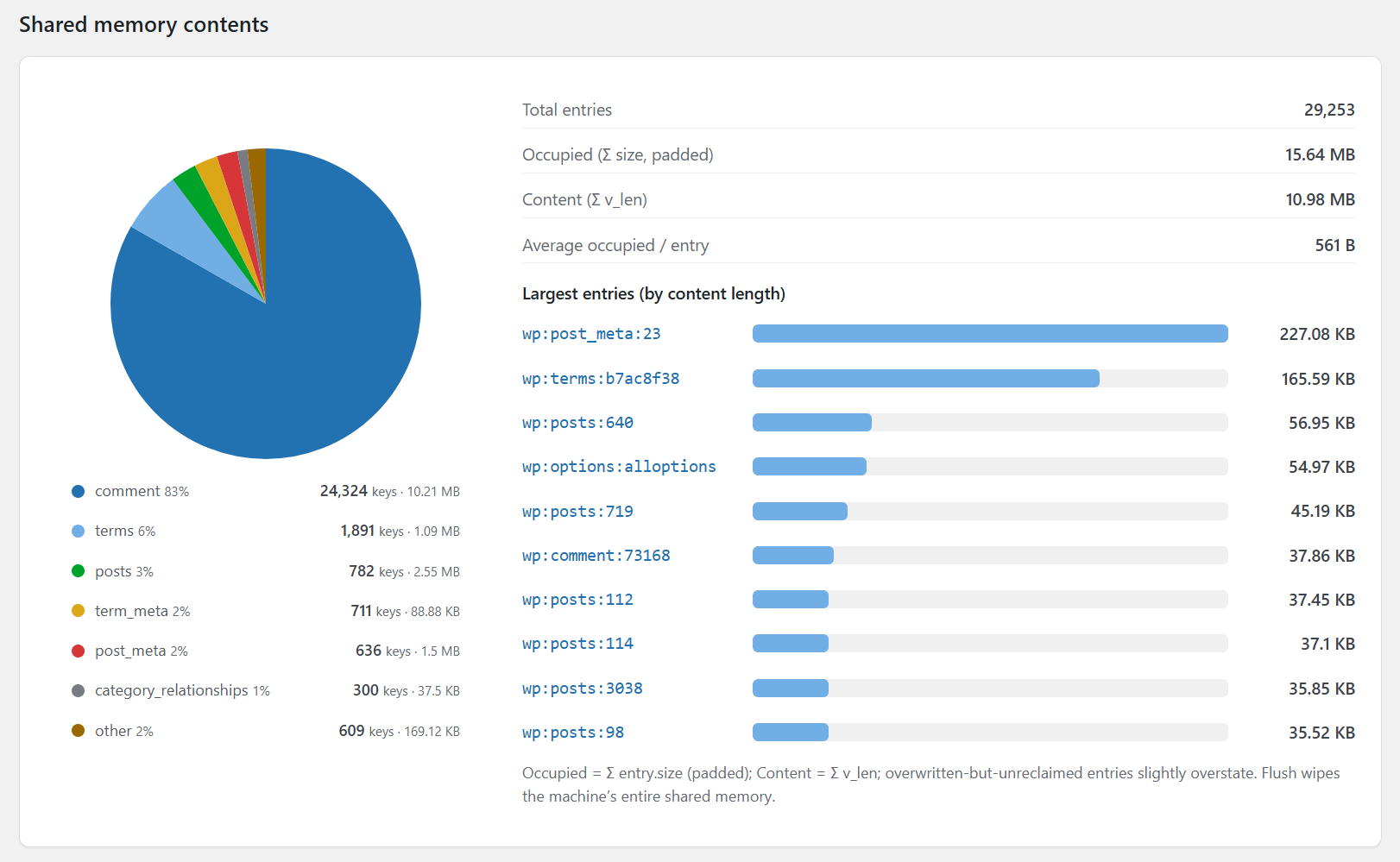
The content statistics go further and answer "who is actually eating the memory". The pie chart breaks keys down by group; Largest entries lists the biggest occupants. On my site, comment-related caches account for ~83% of key count; the larger objects include wp:options:alloptions at ~54.97KB and wp:post_meta:23 at ~227KB.
This data tells you whether the problem is too many keys or a few oversized values. Keys in the panel are kept readable where possible, formatted as <prefix>:<group>:<key>. Beyond the 48-byte budget the group is preserved and only the key portion is hashed, so attribution by group still works.
Caveats
First, Yac is a local shared-memory cache. For single-machine deployments, or clusters where nodes don't need to share cache state, Yac fits well. But in a multi-node cluster where every node must see the same cache, the network sharing of Memcached or Redis is a required feature, not an overhead.
Second, wp_cache_flush() has a wide blast radius. It wipes the entire Yac shared-memory region on that machine — potentially including data of other Yac users in the same PHP-FPM pool. Be especially careful when several sites share a pool; the safer setup is a dedicated PHP-FPM pool per site.
Finally
The object cache was never this blog's biggest bottleneck. The benchmark makes it clear: past ~140 RPS, throughput is limited by PHP page rendering and MySQL.
Even so, replacing Memcached with Yac still yielded close to a 19% throughput gain and lower latency. The reason is simple: WordPress hits the object cache constantly while generating a page, and Yac turns those hits from socket round-trips into shared-memory reads and writes. A little faster each time — and it accumulates into a stably measurable difference.
For a single-machine WordPress site, beyond the speed you also get to stop running and maintaining a Memcached service. If your server allows installing PHP extensions, it's worth a try.
Project: github.com/laruence/wp-yac-cache (GPLv2)
Be First to Comment