- URL: https://www.laruence.com/en/2026/10/30/7736.html
- Please include attribution when republishing.
A couple of days ago I published an article on my WeChat channel about the internals of a PHP vulnerability. It had just passed 30,000 views when it got taken down. The most frustrating part: no explanation of why, and no way to appeal.
So today, no PHP. Let's talk about something else — something we (Realsee) have been working on for the past half year, which I find quite fun: Space HDR.
HDR
What is HDR? The term — High Dynamic Range — should be familiar to everyone by now: the HDR toggle in your phone's camera app, the HDR badge in your photo gallery. It has become infrastructure over the years. But what most people understand as HDR is probably incomplete. The HDR in photography refers to a capture technique: the camera shoots several exposures of the same scene in a row — underexposed frames keep the highlight detail, overexposed frames keep the shadow detail — then merges them into one photo where both ends are visible. That understanding is correct, but it only covers the capture step.
A true HDR needs support along the entire chain: at capture, a wide enough luminance range must be recorded; at storage and transmission, the data must be able to carry that range; and at display, the screen has to actually put out the brightness. If any link fails, what reaches your eyes is still SDR.
That's why you often see photos labeled as HDR that, viewed in a browser, still show the window blown out to pure white and the shadows crushed into black. Because when shared on the Web, the result is still "squeezed down" to SDR.
To understand the difference between SDR and HDR, we first need the unit of luminance: the nit. Take a look at this chart:
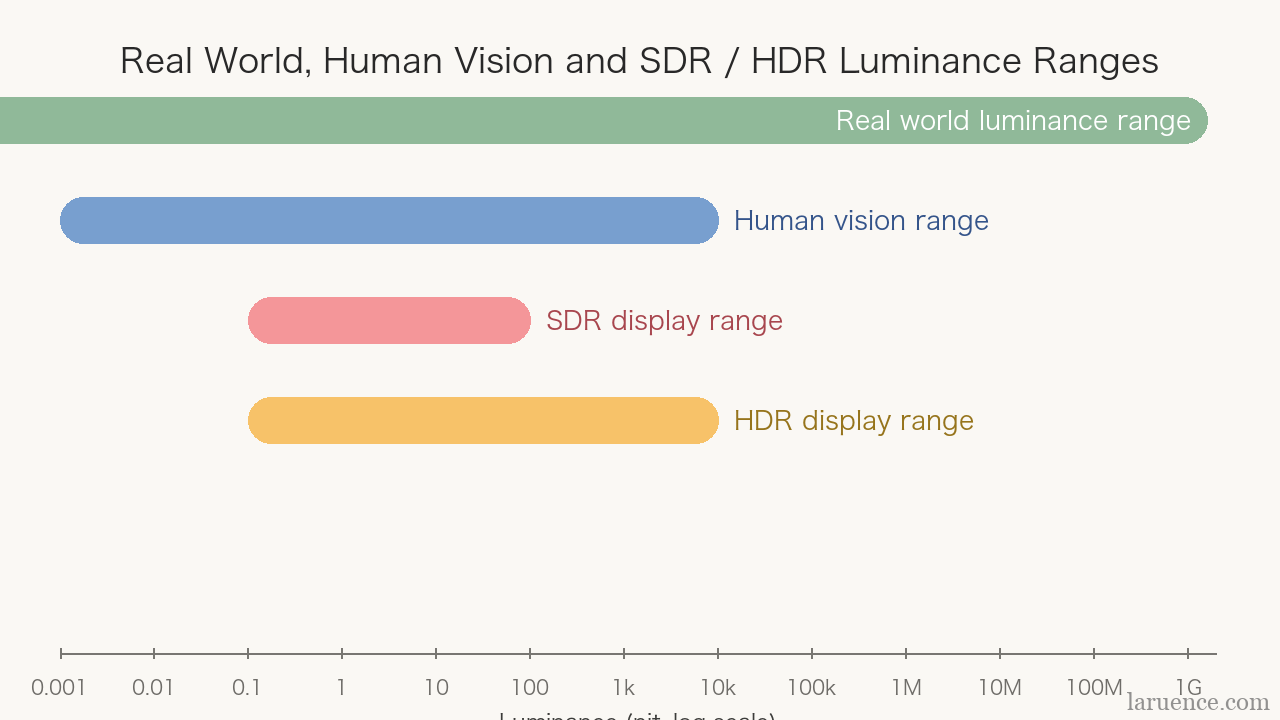
Fig 1: Luminance ranges of the real world, human vision, and SDR/HDR (nit, log scale)
For intuition: the light of an ordinary candle is about 0.5 nit, an overcast sky about 200 nit, and the surface of the sun, 1.6 billion nit..
In the old (SDR) days, the luminance range a screen could show was roughly 0.1 to 100 nit. In other words, when taking a photo, the enormous luminance range of the real world had to be compressed into these two numbers for display. In the SDR era, capture, storage, and display were all built around this standard.
As modern screens get brighter — a phone released recently by a certain brand claims a peak instantaneous brightness of 16,000 nit — capture needs to record a wider luminance range, storage needs more bit depth to hold it, and only on an HDR-capable screen can true HDR finally be displayed.
The capture, storage, and packaging links — we have been working on those for years. The work this time is mainly the display link: delivering real HDR to the screen inside the browser.
Let's start with the capture device.
0x1 Galois
Realsee's spatial intelligence camera is called Galois. The latest generation is the P4, and it is now widely used in Beike's VR house tours, Meituan's restaurant reservations, all kinds of exhibition halls and museums, cultural heritage preservation — and even crime scene recording. For example, the officers of the Hong Kong Police Bomb Disposal Unit use this very product of ours 😊:

Fig 2: Galois P4
It is a laser scanner. Inside the body are a 905nm LiDAR plus a color camera module: a 4/3-inch CMOS, 47 megapixels, producing 300-megapixel 24K panoramas straight out of the device, with an absolute laser ranging error under 10 millimeters.
When shooting, it rotates once in about 16 seconds, capturing 5-6 angles in total, which our algorithms then merge into a single panorama. Unlike the HDR on a phone camera, Galois — from the first generation on — captures 5 differently-exposed RAW frames for every angle of every rotation. RAW is the sensor's original output, unprocessed and uncompressed by the device. With 5 different exposures, the luminance layers are complete. In other words, at the capture link, the HDR information has been there from the very beginning. 🙂
The problem in the past was: captured, but not displayable. The output goes onto the open Web, where it must be easy to share and easy to view — and the Web's support for HDR photos has long lagged far behind its support for video. So all that data, at the output layer, still went out as SDR-format JPEG or AVIF. The data in the RAW was merely stored away.
But technology moves on, and things have changed. Chrome began correctly displaying HDR photos in 2023 (AVIF and Ultra HDR JPEG, starting with Chrome 116); Edge on Windows followed; Safari was the last — not until Safari 26 in 2025 did it natively support HDR images, bringing WebGPU along with it. In other words, by last year, a still photo could finally light up in every mainstream browser.
So the timing was right. We spent half a year rewriting our front-end rendering engine from scratch with WebGPU, letting it go all the way to the screen.
0x2 Storage: the Ultra HDR approach
First, "how to store". Given that many devices still don't support HDR, we had no choice but to adopt Ultra HDR: the base is a plain JPEG SDR image — the format with the best compatibility — plus a gain map, plus metadata interpreting the gain. An ordinary decoder sees just the SDR base image; only one that recognizes the gain map restores HDR. It's like upgrading an old protocol with an optional extension package: old devices that don't recognize it simply ignore it.
The gain map describes, at every position, the relationship between the SDR rendering and the HDR rendering. During restoration, the base image is first converted to linear light, then the gain map is interpreted according to its own gamma, gain range, and offset rules, and the HDR luminance is computed.
We follow the same idea: the data of a panoramic space is also packaged as a base image plus gain map, with hundreds of megabytes of full lighting data compressed into a lightweight format that browsers and phones can handle in real time.
0x3 Adapting: rotate, zoom, switch viewpoints
A static photo is done once the base image and gain map are laid together and left alone — but a panorama is not. The user rotates the view, zooms in for detail, and every rotation and zoom is a re-sampling of the two images, with the gain data having to follow along.
First, rotation. The base image and the gain map must stay aligned in orientation and position at all times. The two images can have different resolutions, but the spec requires that resampling use at least bilinear filtering — otherwise the two images drift out of alignment, and gain gets applied where it shouldn't.
Then, zooming. As you zoom in, the field of view narrows, and the system picks the appropriate level of detail (LOD) for the current view and display size, streaming in local texture patches. Those patches carry gain data too, which must be updated in sync.
There's also an easy trap to step in here: color textures need to be decoded to linear light, but gain textures must not be treated that way — they have to keep their original data meaning. If a gain texture is mistakenly treated as color and transformed again, the luminance relationships come out wrong.
That solves the problems within a viewpoint. There's still those between viewpoints. Each viewpoint has its own set of data: base image, gain map, restoration parameters. When the user switches between viewpoints, the transition has to assess the HDR availability of the two viewpoints separately. If one of them only has an SDR base image, handle it according to its actual content — you can't force the same gain onto both.
0x4 Display: WebGPU
With all that solved, no matter how you rotate, zoom, or switch viewpoints, the luminance data in hand is correct. But there's one last link: how to actually deliver it to the screen. And this link, in the browser, was simply impossible before.
Why? Our previous rendering engine was WebGL-based, and a WebGL canvas outputs 8-bit sRGB color, with values pinned to the range 0 to 1 — anything above 1 gets clamped away. In other words, no matter how accurately the gain was computed upstream, at the final output step, brightness "brighter than white" still couldn't get out. What you saw on screen was still a world limited to the SDR range.
And this isn't something a patch can fix. Take a simplified example — with SDR white as 1 on a linear scale, and w as the gain weight:
H = S × G^w

w = 0   =>  H = 0.5
w = 0.5 =>  H = 1.0
w = 1   =>  H = 2.0
With S = 0.5, G = 4, and zero offset, the output is as above. That 2.0 represents luminance beyond reference white. If any step along the way clamps the value back to 1.0, the distinction is lost. The WebGL canvas was exactly that final link clamping values back to 1.0 — the color output pipeline, as designed, left no opening for extended luminance.
So the only way out was to replace the entire graphics backend. Enter WebGPU: starting with Chrome 129, the WebGPU canvas supports the rgba16float floating-point format and the extended tone mapping mode, so the floating-point luminance of the HDR path can land on the screen without ever being clamped. That's why this rewrite took half a year.
Finally, the timing of drawing. Before each draw, the HDR parameters are determined by user settings, display capabilities, and the chosen backend; on any detected environment change — say you flip the system HDR switch mid-session — parameters are synced, the current draw is skipped, and intermediate textures updated; after drawing, the gain application and canvas configuration are verified again. Any link not matching up, and what comes out is the wrong color.
So how do you know whether the current environment can do HDR? The dynamic-range: high media query provides the signal. If the user has turned HDR off, the capability doesn't match "high", or the engine is actually running WebGL 2 — fall back to the SDR base image. That way, what old devices see is identical to the current version, with no errors. On the Web, unlike with TVs, you can't dictate the whole chain — so every link judges for itself.
0x5 Demo
That's a lot of talk — let's see the result. Here's a case you can try:
Look at the content on the left — there's a "24K HDR" badge in the upper-left corner. This space has the "Sync view" feature enabled: as you rotate, the other side follows you to the same position. One side is HDR, the other SDR — seeing the same scene side by side makes the difference much easier to spot.
Can you see the difference?
If you can't see the HDR badge, or the picture doesn't seem to change, it's most likely because some link of your environment doesn't support HDR. You can try the test button below:
If all three are supported, go back and try the comparison above — you should be able to see the difference. If something isn't supported, try turning on your system's HDR switch, or updating your browser to the latest version (Chrome/Edge 113+, HDR output needs 129+), or switching to a device with an HDR screen — most mainstream phones these days qualify.
0x6 Open Source
We have open-sourced a tool: panorama-viewer. It's a three.js-WebGPU-based panorama viewer — just drag an Ultra HDR JPEG in, and it reads the base image, gain map, and metadata out of it, restores the image on the GPU, and provides a display-gain slider you can adjust in real time. Slide the gain from 0 to full, and you can see directly what HDR adds to the picture.
More Space HDR cases are on Realsee Discover, browsable by category: restaurants, residences, hotels, museums, retail.
0x7 Why It Matters
When people look at photos, the closer the light in the picture gets to what their eyes experienced on the scene, the more real it feels. For VR to be truly "immersive", the luminance range has to be complete — only then does that word carry its weight.
Take Beike, our biggest customer at Realsee: users browse houses on their phones. Whether a room gets good light, whether a north-facing room feels dark — information like this directly shapes their decisions, and it matters enormously.
Or take Meituan's restaurant reservations: take a walk through before booking a booth. The table by the floor-to-ceiling windows, the atmosphere under the spotlights — after the tour, it's nearly as good as having been there in person. Any application where people need to inspect a space works the same way.
Beike's new-home section and Meituan have now rolled out Space HDR listings at scale, with Tujia, Alibaba, and other platforms in the process of integrating it.
That's all for the introduction. If you're interested, here are a few cases to explore:
Be First to Comment